
使用形态学操作对二值图像进行后处理#
形态学操作基于形状来转换图像;在这种情况下,我们通常指的是二值图像。
import numpy as np
from skimage.io import imread
import matplotlib.pyplot as plt
from skimage import morphology
from skimage import filters
核、足迹和结构元素#
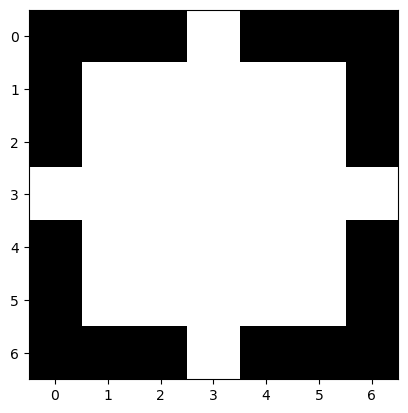
如果我们使用scikit-image,许多形态学滤波器都有一个footprint参数。这个足迹就是滤波器核,在文献中你也会找到结构元素这个术语。
# creates a disk of 1 with radius = 3
disk = morphology.disk(3)
disk
array([[0, 0, 0, 1, 0, 0, 0],
       [0, 1, 1, 1, 1, 1, 0],
       [0, 1, 1, 1, 1, 1, 0],
       [1, 1, 1, 1, 1, 1, 1],
       [0, 1, 1, 1, 1, 1, 0],
       [0, 1, 1, 1, 1, 1, 0],
       [0, 0, 0, 1, 0, 0, 0]], dtype=uint8)
plt.imshow(disk, cmap='gray')
<matplotlib.image.AxesImage at 0x225b0c88340>
# create a square with width and height = 3
square = morphology.square(3)
square
array([[1, 1, 1],
       [1, 1, 1],
       [1, 1, 1]], dtype=uint8)
二值形态学#
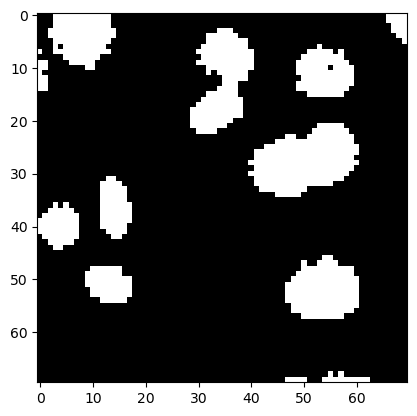
为了演示二值图像的形态学滤波,我们再次使用小的细胞核图像。
image_nuclei = imread('../../data/mitosis_mod.tif').astype(float)
image_binary = image_nuclei > filters.threshold_otsu(image_nuclei)

plt.imshow(image_binary, cmap='gray')
<matplotlib.image.AxesImage at 0x225b0d05490>
腐蚀和膨胀#
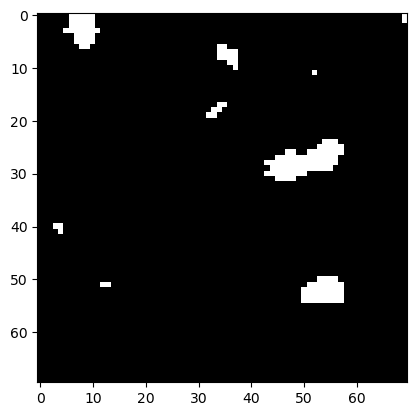
要使黑色海洋中的白色岛屿变小,我们需要_腐蚀_它们的海岸线。
eroded = morphology.binary_erosion(image_binary, disk)

plt.imshow(eroded, cmap='gray')
<matplotlib.image.AxesImage at 0x225b0d80dc0>
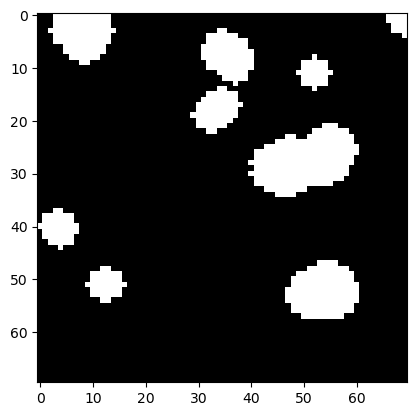
如果我们之后对图像进行膨胀,我们会得到看起来比原始二值图像更平滑的白色岛屿。
eroded_dilated = morphology.binary_dilation(eroded, disk)

plt.imshow(eroded_dilated, cmap='gray')
<matplotlib.image.AxesImage at 0x225b107f730>
连续调用腐蚀和膨胀是如此常见,以至于有一个专门的函数来执行这个操作。由于岛屿之间的间隙_打开_,这个操作被称为_开运算_。
opened = morphology.binary_opening(image_binary, disk)

plt.imshow(opened, cmap='gray')
<matplotlib.image.AxesImage at 0x225b10f9b20>
练习1#
还有一个_闭运算_操作。将其应用于二值图像。
练习2#
在scikit-image文档中搜索最小和最大滤波器。将最小滤波器应用于二值图像,然后将最大滤波器应用于结果。将其与上面显示的图像进行比较。