
图像文件格式的优缺点#
在处理显微镜图像数据时,存在许多文件格式。大多数显微镜供应商都有专有的图像文件格式,图像分析软件供应商提供自定义和部分开放的文件格式。传统文件格式也存在,并得到常见Python库的支持。对于通用图像存储,只有少数图像文件格式如TIF可以被推荐。此外,应避免使用JPEG等格式以保持图像数据的完整性。在本笔记本中,我们将通过将显微镜图像重新保存为这些格式,然后重新加载图像并比较保存前后的图像来测试一些文件格式。
另请参阅
from skimage.data import cells3d
from skimage.io import imread, imsave
import pyclesperanto_prototype as cle
import matplotlib.pyplot as plt
import pandas as pd
import numpy as np
import os
import warnings
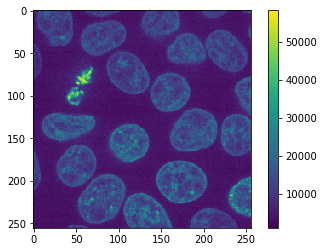
作为示例图像,我们使用scikit-image提供的Cells 3D示例图像,该图像由Allen细胞科学研究所提供。它是一个无符号16位整数图像。在第一次尝试中,我们将只选择单个通道和平面。
original_image = cells3d()[30, 1]
cle.imshow(original_image, colorbar=True)
为什么应该避免使用JPEG#
JPEG文件格式,至少在许多程序的默认设置下,是一种有损文件格式。这意味着在保存图像时会丢失信息。
imsave("temp.jpg", original_image)
Lossy conversion from uint16 to uint8. Losing 8 bits of resolution. Convert image to uint8 prior to saving to suppress this warning.
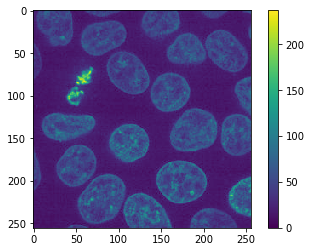
上面的警告证实了这一点。此外,当我们重新加载图像时,我们可以在颜色条中看到强度范围现在不同了。
jpg_image = imread("temp.jpg")

cle.imshow(jpg_image, colorbar=True)
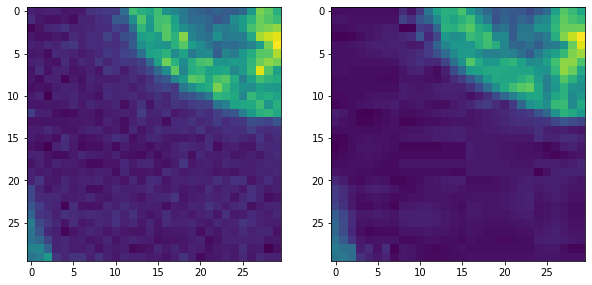
此外,如果我们放大,我们可以看到两种典型的JPEG伪影。
图像被去噪。
我们看到补丁,例如8x8像素大小,以及朝不同方向的条纹。
fix, axs = plt.subplots(1,2,figsize=(10,10))

cle.imshow(original_image[140:170, 0:30], plot=axs[0])
cle.imshow(jpg_image[140:170, 0:30], plot=axs[1])
为了定量研究这些错误,并测试多种文件格式,我们编写一个简短的函数,该函数保存并重新加载图像,并输出一个包含一些测量结果的表格,
def resave_image_statistics(original_image):
    """以多种格式保存并重新加载图像,并返回包含图像统计信息的表格。"""

    # 准备表格
    stats = {
        "ending":[],
        "data_type":[],
        "shape":[],
        "size":[],
        "min":[],
        "max":[],
        "mean":[],
        "standard_deviation":[],
        "mean_squared_error":[],
    }

    # 遍历不同的文件扩展名
    endings = [None, "tif","png","mhd","mha","jpg","gif","bmp"]
    for ending in endings:
        try:
            if ending is None:
                # 使用原始图像作为第一个测试
                reloaded_image = original_image
                size = np.NaN
            else:
                # 保存并重新加载图像
                filename = "temp." + ending
                imsave(filename, original_image)

                reloaded_image = imread(filename)
                size = os.path.getsize(filename)

            # 确定统计信息
            stats["ending"].append(ending)
            stats["data_type"].append(reloaded_image.dtype)
            stats["shape"].append(reloaded_image.shape)
            stats["size"].append(size)
            stats["min"].append(np.min(reloaded_image))
            stats["max"].append(np.max(reloaded_image.astype(float)))
            stats["mean"].append(np.mean(reloaded_image))
            stats["standard_deviation"].append(np.std(reloaded_image))

            stats["mean_squared_error"].append(np.mean((original_image - reloaded_image)**2))

        except ValueError:
            # 某些格式不受支持
            warnings.warn("不支持的文件格式: " + ending)
            pass

    return pd.DataFrame(stats)
接下来,我们将该函数应用于2D图像切片。
resave_image_statistics(cells3d()[30, 1])
Lossy conversion from uint16 to uint8. Losing 8 bits of resolution. Convert image to uint8 prior to saving to suppress this warning.
Lossy conversion from uint16 to uint8. Losing 8 bits of resolution. Convert image to uint8 prior to saving to suppress this warning.
Lossy conversion from uint16 to uint8. Losing 8 bits of resolution. Convert image to uint8 prior to saving to suppress this warning.
| ending | data_type | shape | size | min | max | mean | standard_deviation | mean_squared_error | |
|---|---|---|---|---|---|---|---|---|---|
| 0 | None | uint16 | (256, 256) | NaN | 1091 | 58327.0 | 9346.115417 | 6139.322637 | 0.000000 |
| 1 | tif | uint16 | (256, 256) | 131328.0 | 1091 | 58327.0 | 9346.115417 | 6139.322637 | 0.000000 |
| 2 | png | uint16 | (256, 256) | 107470.0 | 1091 | 58327.0 | 9346.115417 | 6139.322637 | 0.000000 |
| 3 | mhd | uint16 | (256, 256) | 281.0 | 1091 | 58327.0 | 9346.115417 | 6139.322637 | 0.000000 |
| 4 | mha | uint16 | (256, 256) | 131350.0 | 1091 | 58327.0 | 9346.115417 | 6139.322637 | 0.000000 |
| 5 | jpg | uint8 | (256, 256) | 9271.0 | 0 | 237.0 | 36.005875 | 23.824527 | 32596.059555 |
| 6 | gif | uint8 | (256, 256) | 58225.0 | 4 | 227.0 | 36.014725 | 23.978329 | 32236.271164 |
| 7 | bmp | uint8 | (256, 256) | 66614.0 | 4 | 227.0 | 36.014725 | 23.978329 | 32236.271164 |
保存3D图像#
我们可以使用相同的函数来测试哪些文件格式支持3D图像。
resave_image_statistics(cells3d()[30])
File format not supported: png
File format not supported: mhd
File format not supported: mha
File format not supported: jpg
File format not supported: gif
File format not supported: bmp
| ending | data_type | shape | size | min | max | mean | standard_deviation | mean_squared_error | |
|---|---|---|---|---|---|---|---|---|---|
| 0 | None | uint16 | (2, 256, 256) | NaN | 277 | 58327.0 | 5925.968422 | 5711.584119 | 0.0 |
| 1 | tif | uint16 | (2, 256, 256) | 262566.0 | 277 | 58327.0 | 5925.968422 | 5711.584119 | 0.0 |
保存4D图像#
cells3d数据集实际上是一个4D数据集。它还包含通道。因此,我们也可以用它来测试保存和重新加载4D数据。
resave_image_statistics(cells3d())
File format not supported: png
File format not supported: mhd
File format not supported: mha
File format not supported: jpg
File format not supported: gif
File format not supported: bmp
| ending | data_type | shape | size | min | max | mean | standard_deviation | mean_squared_error | |
|---|---|---|---|---|---|---|---|---|---|
| 0 | None | uint16 | (60, 2, 256, 256) | NaN | 0 | 65535.0 | 4837.14054 | 3985.348828 | 0.0 |
| 1 | tif | uint16 | (60, 2, 256, 256) | 15748650.0 | 0 | 65535.0 | 4837.14054 | 3985.348828 | 0.0 |
练习#
确定’ico’和’raw’文件格式是否受支持。