
(image-filtering:background_removal=)
背景去除滤波器#
还有一些背景去除滤波器。如果整个图像上存在或多或少均匀分布的强度,可能在某个方向上增加,建议在分割图像之前先去除这个背景。
import numpy as np
from skimage.io import imread
from pyclesperanto_prototype import imshow
from skimage.filters import gaussian
from skimage.restoration import rolling_ball
from skimage.morphology import disk
import matplotlib.pyplot as plt
from skimage.filters import difference_of_gaussians
from skimage.morphology import white_tophat
作为示例图像,我们将使用一个斑马鱼眼睛数据集(由Max Planck CBG研究所Norden实验室的Mauricio Rocha Martins提供)。如你所见,在我们稍后要分割的细胞核周围存在一些强度扩散。这种背景信号的来源是失焦光。
# load zfish image and extract a channel
zfish_image = imread('../../data/zfish_eye.tif')[:,:,0]

imshow(zfish_image)
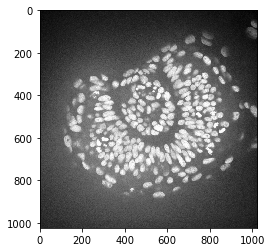
为了减去背景,我们首先需要确定它。我们可以使用滚动球算法来实现。半径参数配置了在确定背景强度时应该考虑多远的像素。
background_rolling = rolling_ball(zfish_image, radius=25)

imshow(background_rolling)
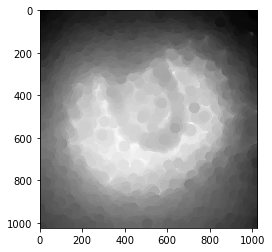
之后,我们从原始图像中减去背景并显示所有三张图像:
zfish_rolling = zfish_image - background_rolling

fig, axs = plt.subplots(1, 3, figsize=(15,10))

# first row
imshow(zfish_image, plot=axs[0])
axs[0].set_title("原始图像")
imshow(background_rolling, plot=axs[1])
axs[1].set_title("背景(滚动球)")
imshow(zfish_rolling, plot=axs[2])
axs[2].set_title("背景减除后")
Text(0.5, 1.0, 'Background subtracted')
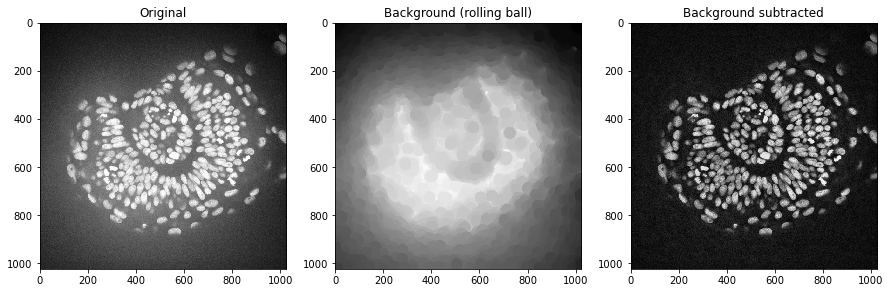
我们可以使用高斯模糊滤波器做同样的事情。
background_gaussian = gaussian(zfish_image, sigma=20, preserve_range=True)

zfish_gaussian = zfish_image - background_gaussian

fig, axs = plt.subplots(1, 3, figsize=(15,10))

# first row
imshow(zfish_image, plot=axs[0])
axs[0].set_title("原始图像")
imshow(background_gaussian, plot=axs[1])
axs[1].set_title("背景(高斯)")
imshow(zfish_gaussian, plot=axs[2])
axs[2].set_title("背景减除后")
Text(0.5, 1.0, 'Background subtracted')
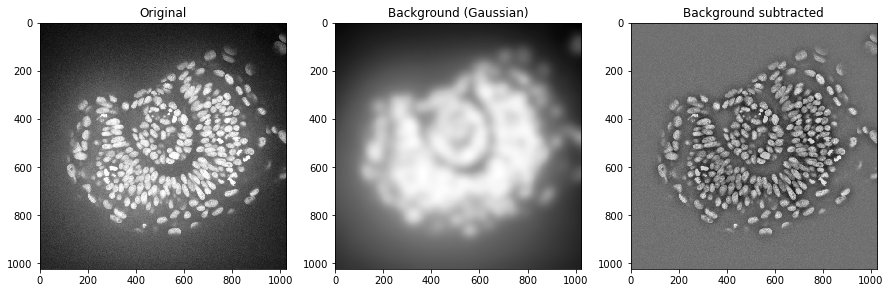
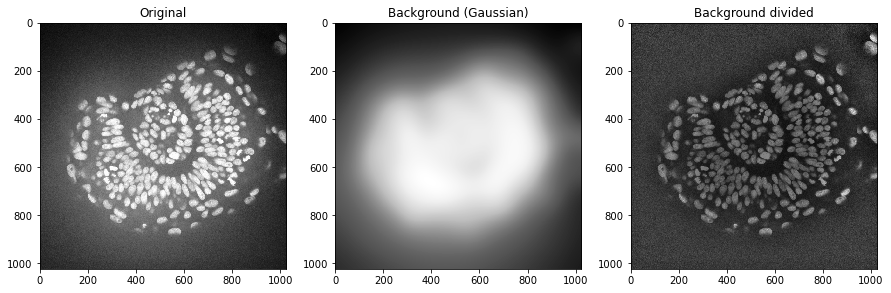
在某些情况下,将图像除以背景也是有意义的。例如,这有助于使此图像中的所有细胞核具有相似的强度。这对于细胞核分割可能是有利的。
background_gaussian = gaussian(zfish_image, sigma=50, preserve_range=True)

zfish_gaussian = zfish_image / background_gaussian

fig, axs = plt.subplots(1, 3, figsize=(15,10))

# first row
imshow(zfish_image, plot=axs[0])
axs[0].set_title("原始图像")
imshow(background_gaussian, plot=axs[1])
axs[1].set_title("背景(高斯)")
imshow(zfish_gaussian, plot=axs[2])
axs[2].set_title("背景除法后")
Text(0.5, 1.0, 'Background divided')
其他背景减除技术#
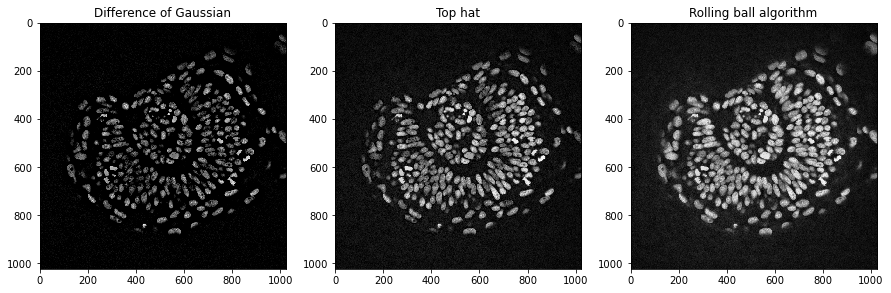
还有其他的背景减除技术,如顶帽变换。此外,高斯差分(DoG)是一种结合去噪和背景去除的技术。
# DoG

zfish_dog = difference_of_gaussians(zfish_image, 0, 15)

# Top-Hat
zfish_top_hat = white_tophat(zfish_image, disk(15))

fig, axs = plt.subplots(1, 3, figsize=(15,10))

# first row
imshow(zfish_dog, plot=axs[0], min_display_intensity=0)
axs[0].set_title("高斯差分")
imshow(zfish_top_hat, plot=axs[1])
axs[1].set_title("顶帽变换")
imshow(zfish_rolling, plot=axs[2])
axs[2].set_title("滚动球算法")
Text(0.5, 1.0, 'Rolling ball algorithm')
练习#
在斑马鱼眼睛数据集上应用不同的算法和半径来去除背景。使用裁剪放大数据集,并找出如何最优地去除背景。