Transformations affines avec scikit-image#
Ce notebook démontre comment appliquer des transformations affines à des images 3D.
import numpy as np
import matplotlib
import matplotlib.pyplot as plt
from skimage.io import imread
# Laod example data
np_array = imread('../../data/Haase_MRT_tfl3d1.tif')
np_array.shape
(192, 256, 256)
Pour configurer une transformation affine, vous pouvez le faire en utilisant une matrice de transformation 4x4 :
transform_matrix = np.asarray([
    [1, 0, 0, 50],
    [0, 2, 0, 0],
    [0, 0, 0.5, 0],
    [0, 0, 0, 1]
])
Scikit-image ne prend en charge que les transformations 2D, nous choisissons donc une tranche à transformer :
# pull image stack from GPU and pick a slice
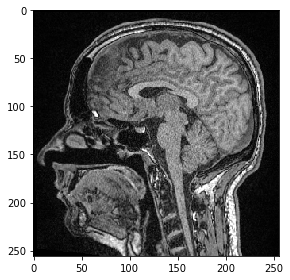
image = np_array[100]

from skimage.io import imshow
imshow(image)
<matplotlib.image.AxesImage at 0x25a6cff0d30>
Nous définissons maintenant une transformation affine en utilisant scikit-image et l’appliquons à l’image.
from skimage import transform as tf

# define transform with #scikit image
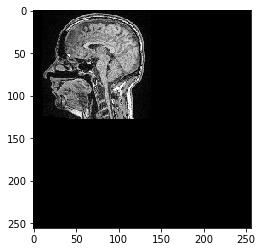
transform = tf.AffineTransform(scale=0.5, translation=[10,0])

transformed_image = tf.warp(image, transform.inverse)
imshow(transformed_image)
<matplotlib.image.AxesImage at 0x25a6edb8d60>
Interopérabilité avec clesperanto#
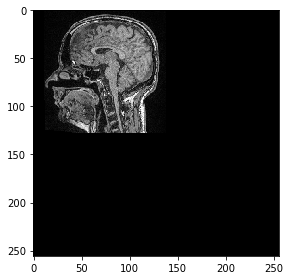
Ensuite, nous envoyons cette image d’un seul plan sur le GPU et la transformons en utilisant pyclesperanto
import pyclesperanto_prototype as cle

cle.select_device('RTX')
<gfx90c on Platform: AMD Accelerated Parallel Processing (2 refs)>
image_gpu = cle.push(image)

# define transform with #scikit image
from skimage import transform as tf
transform = tf.AffineTransform(scale=0.5, translation=[10,0])

transformed_image = cle.affine_transform(image_gpu, transform=transform)
cle.imshow(transformed_image, color_map="Greys_r")
c:\structure\code\pyclesperanto_prototype\pyclesperanto_prototype\_tier9\_imshow.py:14: UserWarning: The imshow parameter color_map is deprecated. Use colormap instead.
  warnings.warn("The imshow parameter color_map is deprecated. Use colormap instead.")